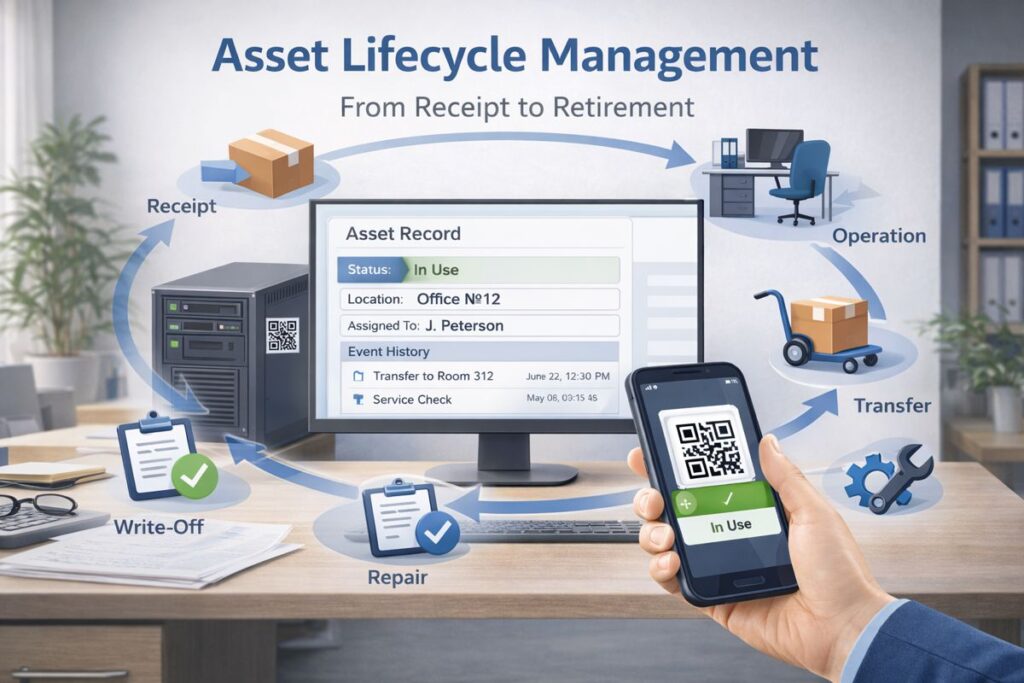
Asset Lifecycle Management
Asset tracking stops being “a list in a spreadsheet” the moment you manage the full lifecycle of each item—from the day it enters the organization to the day it is retired. The value is not in the number of rows you store, but in a verified history of events, clear accountability, and transparent control over transfers, maintenance, audits, and write-offs. That is why many companies move to automated, QR-based workflows: a single asset card, mobile scanning, and event logs turn asset management into a reliable operational process instead of periodic manual reconciliation.
What an asset lifecycle actually means
An asset lifecycle is the sequence of states and actions an asset goes through inside your organization. It helps to separate two concepts:
- Status reflects the asset’s current condition in the process (for example, “In use” or “In repair”).
- Event is a recorded action that explains what changed and why (for example, “Transferred to Room 312,” with who/when/approval).
This distinction is critical. Status gives you a snapshot. Events give you evidence and traceability. When both are connected, you can answer the operational questions that matter: where the asset is, who is responsible, what happened to it, and what it has cost to keep it running.
Why lifecycle beats “just an asset register”
A static register becomes outdated the moment assets start moving. Equipment gets assigned to employees, relocated between rooms, temporarily stored, sent for repair, upgraded, or partially replaced. If these changes are not captured immediately, asset data drifts away from reality.
The consequences are practical and costly: duplicate purchases, downtime due to “missing” items, disputes over responsibility, and painful audits. A lifecycle approach prevents this by making every change a controlled and recorded event, not an informal action.
The asset record as a “passport”
A strong lifecycle relies on a consistent asset card—think of it as a passport that combines key data with the full history. A practical asset card typically includes the asset name and category, model, serial number (when relevant), responsible person, department, location, acquisition and commissioning dates, and any attributes your internal control requires. Most importantly, it contains an event timeline: transfers, audits, maintenance, repairs, upgrades, and retirement actions.
A good system makes this history easy to view and hard to lose.
Roles and accountability
Lifecycle control is not only about software. It is a process with roles. Departments are responsible for day-to-day use and safekeeping. Procurement or stores handle receipt and issuing. Finance and compliance need defensible documentation. Managers approve exceptions and retirement decisions. A system administrator maintains master data and permissions so users can do the right thing quickly.
When responsibilities are clear, ownership issues decrease and audit readiness improves.
Receipt and identification
The lifecycle begins at receipt. This is where data quality is created. If you onboard assets inconsistently, you will carry inaccuracies through every later stage.
At receipt, you confirm the item, create the asset card, and apply a durable label. QR labels (or barcodes) must be practical: placed where they can be scanned in real conditions—warehouse areas, back-of-house spaces, humid zones, technical rooms, or on moving equipment.
Commissioning and assignment
Commissioning is where an asset becomes operational. The essential steps are assigning a responsible person and a location. Without these, audits turn into searches, and transfers become invisible.
Many teams also capture baseline evidence: photos, комплектность (complete set), and initial condition notes. This improves later checks and reduces disputes.
Operations, transfers, and change control
Most lifecycle “leaks” happen during daily operations. People move items because it is urgent and forget to update records because the process is inconvenient.
That is why the best practice is simple: when location, responsible person, or condition changes, record an event immediately. With mobile scanning, the event is captured where the action happens. Transfers should record from/to locations, initiator, receiver, timestamps, and confirmation. This reduces unauthorized movement and makes the history defensible.
Maintenance and repairs as lifecycle events
For equipment and engineering assets, maintenance is not optional—it is a core part of lifecycle management. Without repair history, you cannot assess reliability, true cost of ownership, or replacement timing.
A practical workflow includes maintenance schedules, service checklists, repair requests, repair outcomes, downtime, and related costs (even if financial posting happens elsewhere). The operational team needs visibility into what failed, how often, and how long the asset was unavailable.
Audits and inventory checks
Inventory checks are the reality test for your lifecycle discipline. If physical presence and recorded location do not match, it means events were not captured or permissions allow uncontrolled changes.
The most efficient approach is frequent, short checks instead of rare “big campaigns.” With QR scanning, verification takes seconds. Teams can also capture current condition and photos to detect wear, damage, or missing parts. Discrepancies should be processed through clear outcomes: found, not found, moved without transfer, wrong location, or misidentified item—each outcome becomes a controlled event, not an unresolved problem.
Retirement, write-off, disposal, and sale
The lifecycle ends when the asset leaves your operational control. It is important to separate administrative retirement (the recorded event) from physical actions like disposal, transfer, or sale. If these get mixed, you risk “paper retirements” while assets still exist and move.
Retirement should be recorded with reason codes, approvals, and supporting evidence. A good history—repairs, audits, utilization, downtime—makes retirement decisions easier and more defensible.
Lifecycle statuses and transition rules
Statuses should stay simple and map to real operational states. A practical set often includes “In stock,” “In use,” “In transfer,” “In repair,” “Reserved,” and “Retired.” The goal is clarity, not bureaucracy.
What matters is transition rules: who can change statuses, which transitions require confirmation, and which are blocked without an event record. This is where systems deliver control without slowing people down.
Reporting that turns tracking into management
When lifecycle management is implemented correctly, reporting becomes a management tool. Leaders can see assets by location, department, and responsible person; identify items that frequently break; track repair backlogs and downtime; and monitor audit discipline.
Operational metrics also become measurable: percentage of assets with verified location, number of transfers without confirmation, audit “found rate,” assets stuck in repair, and average downtime. These indicators directly affect costs and service quality.
Practical implementation guidance
Start with a pilot: one site, one department, one asset category. Define a minimal required asset card, a small set of statuses, and one or two essential documents (typically receipt, transfer, and retirement). Expand next with maintenance workflows and deeper audit scenarios.
Three rules usually make the difference:
- Record events at the moment of action, not later
- Require confirmation for changes in location and responsibility
- Run short, frequent checks instead of rare, exhausting inventories
Conclusion
Asset lifecycle management is a practical way to reduce losses, prevent duplicate purchases, and make accountability transparent. It connects the asset card, statuses, and evidence-based events into one coherent process where every change is traceable. This approach works best when supported by QR labeling, mobile scanning, and fast operational workflows. That is exactly why companies choose QR-Assets web applications: to build a complete asset history, control transfers and responsibility, and make inventory checks dramatically faster—without turning asset tracking into paperwork.